location_onNOW AT KOCHI Everything around you, in one app.
Services
Food Grocery Rides Parcel Driver Doctors Fair Price Jobs Property Academy Branding Kochi Guide
Menu
User manual

NowAt help book.

How to use the NowAt apps — for customers, businesses and drivers — step by step, with screenshots.

smartphone
For customers

NowAt

Everything happening around you in Kochi, plus food, grocery, rides, doctors, home services, jobs and homes — in one app.

Getting started

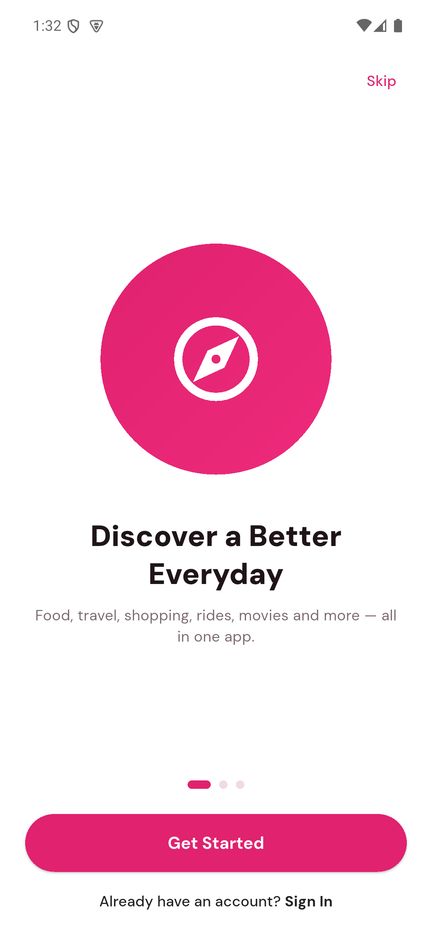
NowAt — Install and sign in screen

Install and sign in

Download NowAt from nowat.in/app.html and open it.

  1. Tap Get Started (new) or Sign In (already have an account).
  2. Enter your mobile number and tap Send code.
  3. Type the 6-digit code from the SMS. The same code creates your account the first time — you must be 18 or older.
  4. Add your name and a profile photo when asked. You stay signed in until you log out.
lightbulbLost access to your number? Tap Lost access to your number? on the sign-in screen to recover your account with your email.
NowAt — Choose your area screen

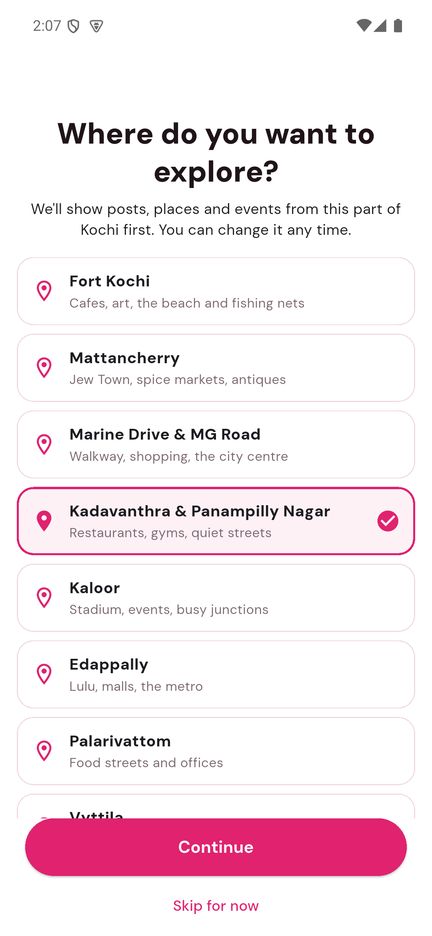
Choose your area

NowAt shows posts, places and events from your part of Kochi first.
  1. Pick the area you live or spend time in (Fort Kochi, Kaloor, Edappally …).
  2. Change it any time from the menu (☰) → Your area.

Home, posts and the map

NowAt — Home screen

Home

Your Home screen shows what is happening near you right now.

  1. For You shows posts picked for your area; Nearby shows posts on a map and by distance.
  2. The round photos at the top are check-ins of people you follow (visible for 2 hours).
  3. CityPlus lists local reports — potholes, waste, accidents — that people nearby confirm or dispute.
  4. The Services row opens Fair Price, Food, Grocery, Rides and more.
  5. Bottom bar: Home · Services · + (create) · Search · Chat. Your photo (top right) opens your profile.
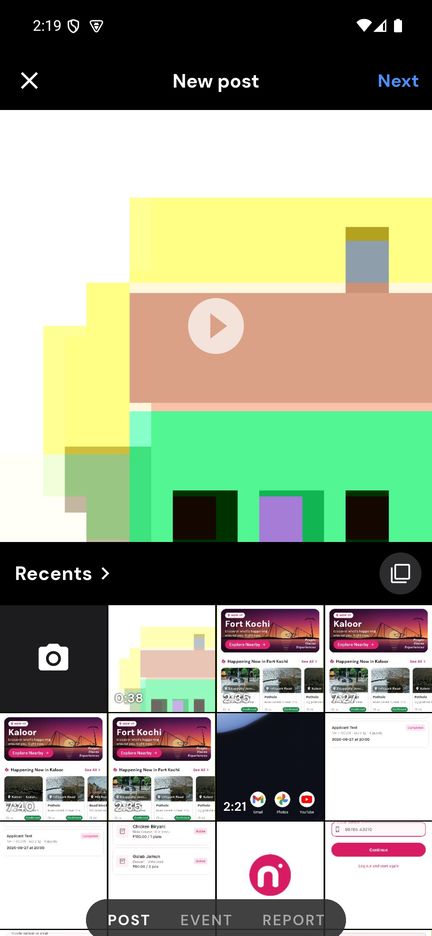
NowAt — Create a post, event or report screen

Create a post, event or report

Tap the pink + button.

  1. Choose photos or a video from your gallery, or tap the camera tile. Switch between POST, EVENT and REPORT at the bottom.
  2. Edit your photos: filters, text, crop. Tap Next.
  3. Write a caption, tag people and add the place. Choose who can see it: Everyone, Connections or Special friends.
  4. For a public post you can switch on Start a circle — a group chat for the post that anyone can join.
  5. Tap Share. Photos are made smaller automatically so they upload fast.
lightbulbReports need a photo and your location, so people nearby can confirm them.
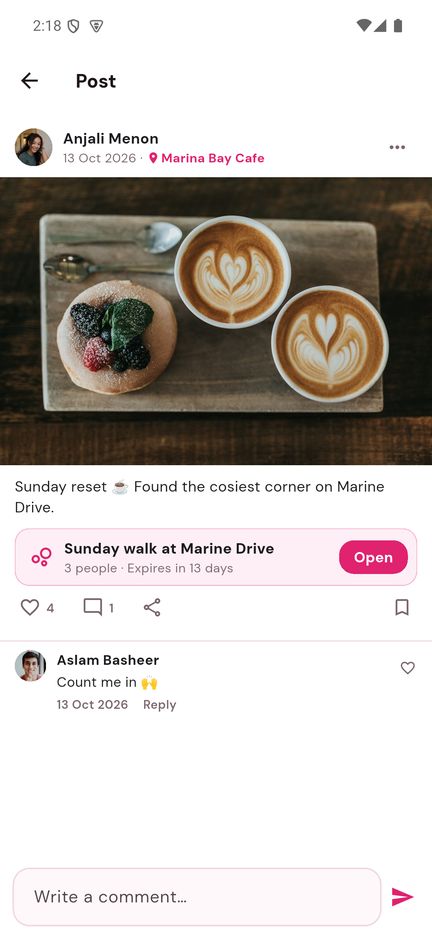
NowAt — A post screen

A post

Tap any post to open it.

  1. Like ♡, comment, share (to chats, WhatsApp and other apps) and save 🔖 posts.
  2. If the post has a circle, tap Join (or Open if you are in it) to chat with everyone in it.
  3. Your own post: tap ⋯ to Edit, Delete or Start a circle. Someone else's: ⋯ → Report.
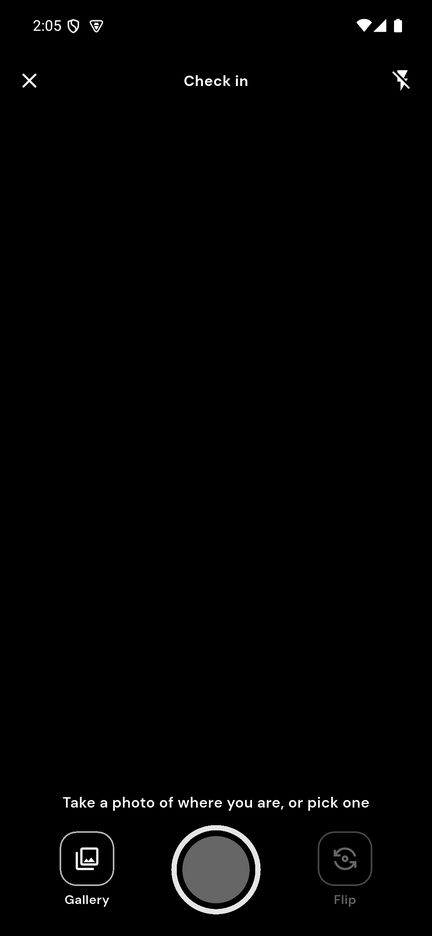
NowAt — Check in screen

Check in

Tell your friends where you are right now.

  1. On Home tap Check in and take a photo where you are (or pick one from your gallery).
  2. Choose who sees it — your usual connections or only your Special friends.
  3. A check-in shows for 2 hours. You can check in once a day.
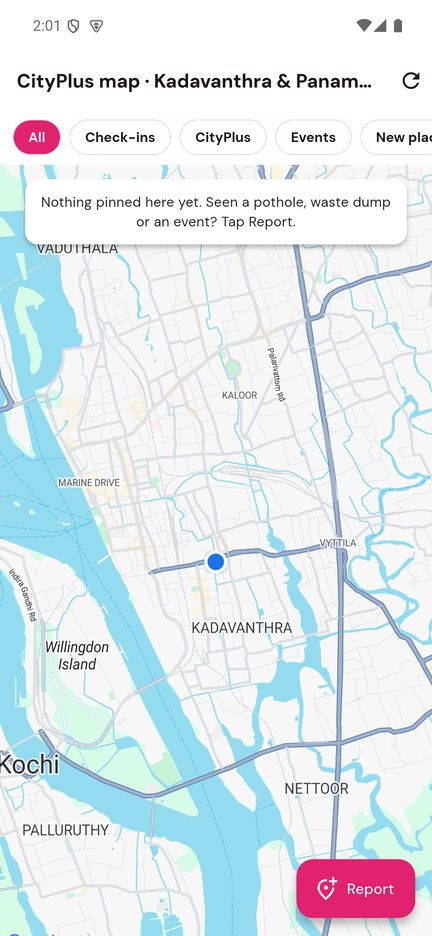
NowAt — CityPlus map screen

CityPlus map

See reports, events and places on the map.

  1. Filter by All, Check-ins, CityPlus or New places.
  2. Tap Report to report a problem where you are standing.
  3. The map shows how many people are checked in around a spot — never their names.
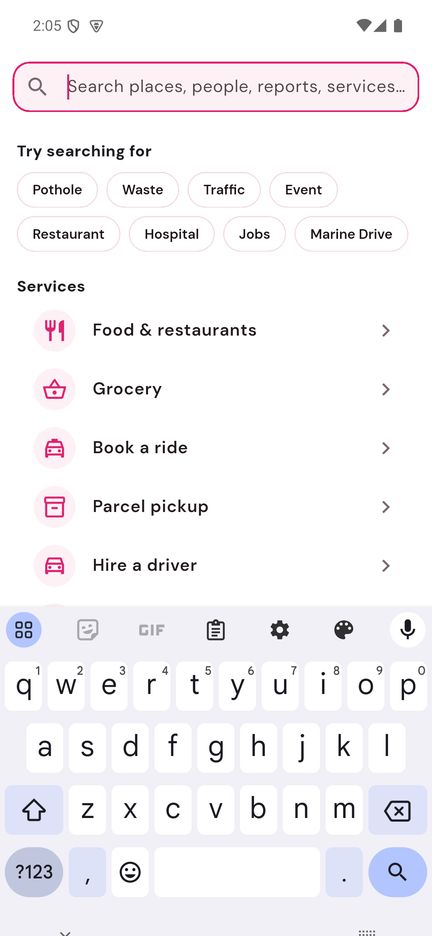
NowAt — Search and explore screen

Search and explore

Find places, people, reports and services.

  1. Type a name, place or service. Recent searches are kept for you.
  2. Tap a suggestion chip (Pothole, Restaurant, Jobs …) to search quickly.

People, chat and circles

NowAt — Chat screen

Chat

All your conversations in one place.

  1. Chats are one-to-one; Circles are group chats; Requests are invitations to circles.
  2. Send text, photos, videos and documents. Swipe a message right to reply; hold it to copy, forward or delete.
  3. Hold a chat in the list to select and delete it. Tap + to start a chat with your contacts on NowAt.
NowAt — Circles screen

Circles

A circle is a group chat around a post that anyone can join.

  1. Open Circles from the menu (☰), or Chat → Circles → Explore circles.
  2. Open circles lists circles you can join; My circles lists the ones you are in.
  3. Tap Join to enter. To start your own, open your public post → ⋯ → Start a circle.
lightbulbA circle stays open while people use it. It expires after 14 days without a message — every new message restarts the 14 days.
NowAt — Inside a circle screen

Inside a circle

The top of the chat shows how many people are in it and when it expires.

  1. Tap the name to see the members. Use ⋮ to add people, rename the circle or leave it.
  2. If you leave, you can join again after 24 hours.
NowAt — Special friends screen

Special friends

A private list of people for posts and check-ins you want to share with just a few.

  1. Menu (☰) → Special friends. Search people you follow and tap Add.
  2. When posting or checking in, choose Special friends as the audience.
  3. Nobody is told when you add or remove them.
NowAt — Find friends screen

Find friends

See which of your phone contacts are on NowAt.

  1. Allow access to contacts, or search people by name instead.
  2. Follow people to see their posts and check-ins.
NowAt — Notifications screen

Notifications

Likes, comments, follows, orders and bookings.

  1. Tap the 🔔 bell on Home. Tap a notification to open what it is about.

Your profile and settings

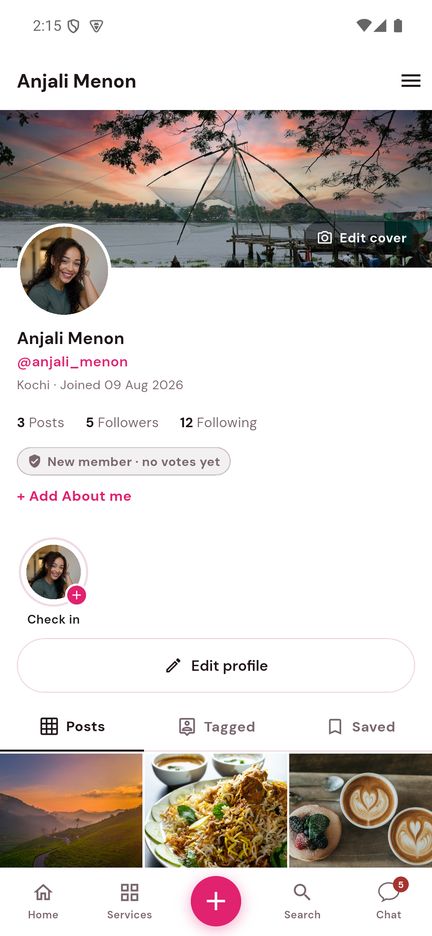
NowAt — Your profile screen

Your profile

What other people see about you.

  1. Change your cover and profile photo, add an About line, see Posts, Tagged and Saved.
  2. Tap Edit profile to change your details.
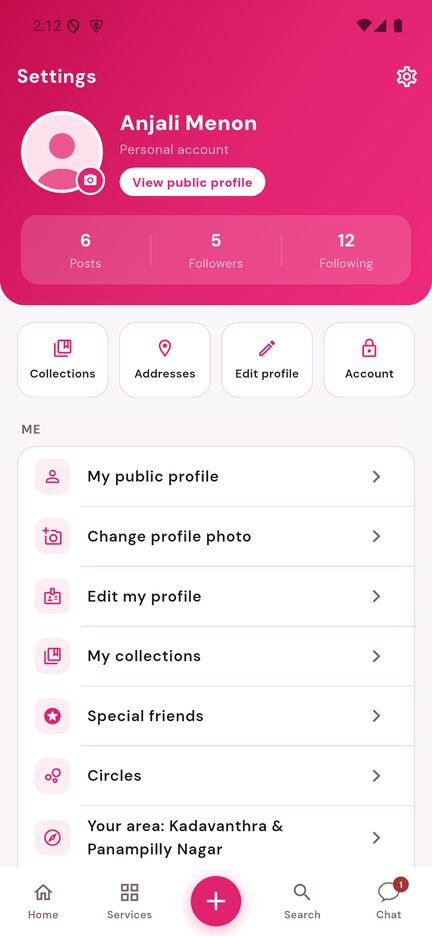
NowAt — Menu screen

Menu

Tap ☰ on your profile.

  1. Me: profile, photo, collections, Special friends, Circles, your area, location & privacy, addresses, notifications.
  2. Services and Orders & bookings: every service and everything you have booked.
  3. Account: account settings, terms, privacy policy, log out.
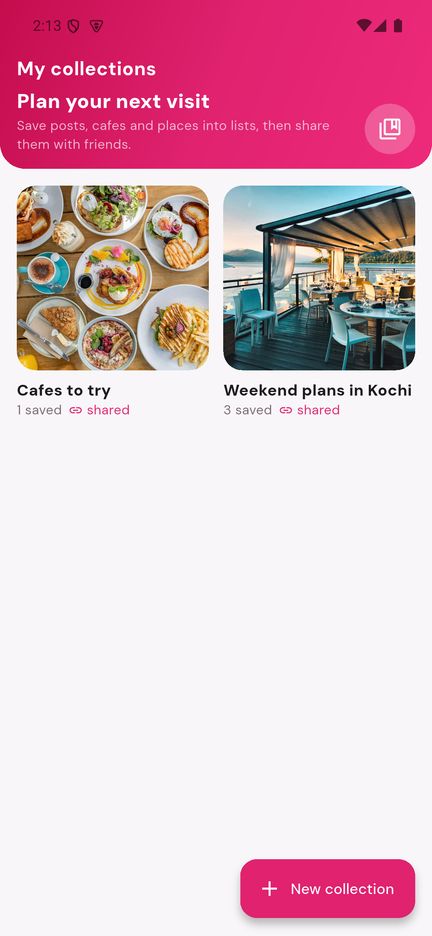
NowAt — Collections screen

Collections

Save posts and places into lists and share plans with friends.

  1. Tap 🔖 on a post → choose or create a collection.
  2. Open a collection and share its link — friends can view it without an account.
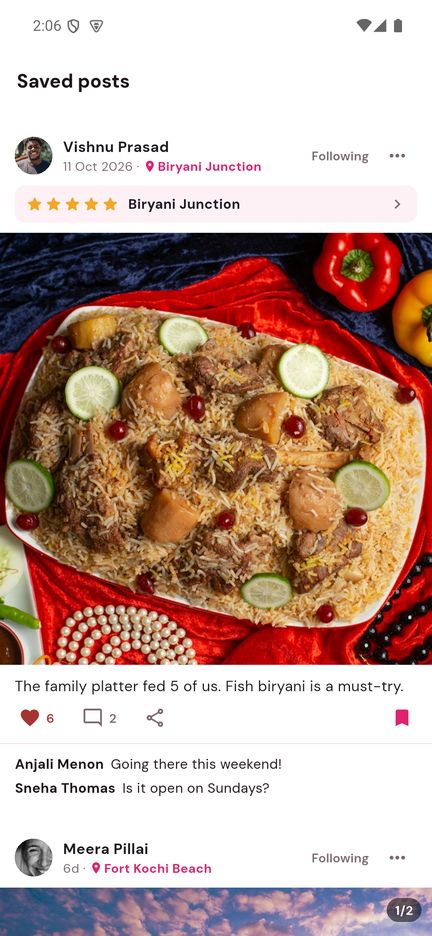
NowAt — Saved posts screen

Saved posts

Everything you bookmarked, in one list.

  1. Profile → Saved tab, or Menu → My collections.
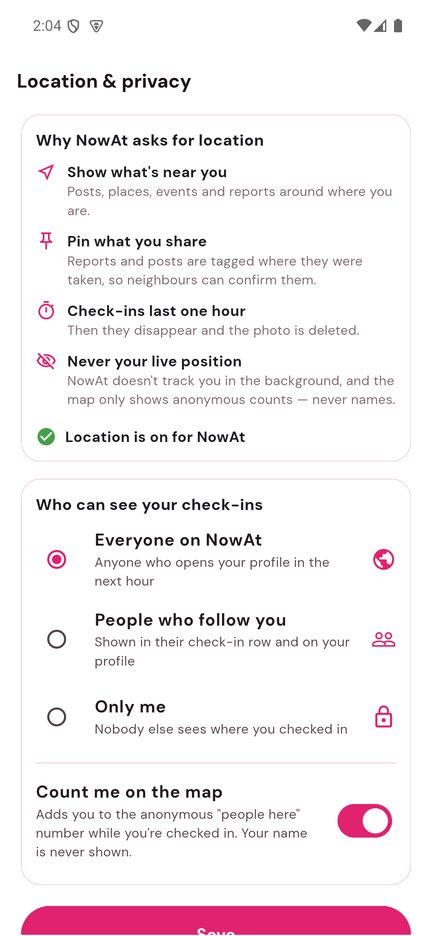
NowAt — Location & privacy screen

Location & privacy

You decide who sees your check-ins.

  1. Choose Everyone on NowAt, People who follow you, or Only me.
  2. Switch Count me on the map off to leave the anonymous people counts.
NowAt — Saved addresses screen

Saved addresses

Home, office and other addresses for quick checkout and rides.

  1. Tap Add address, pin it on the map and give it a name.
NowAt — Account settings screen

Account settings

Your contact details, legal pages and account deletion.

  1. Add an email so you can recover your account if you lose your phone.
  2. Delete account removes your account; you have 90 days to change your mind by signing in again.

Services

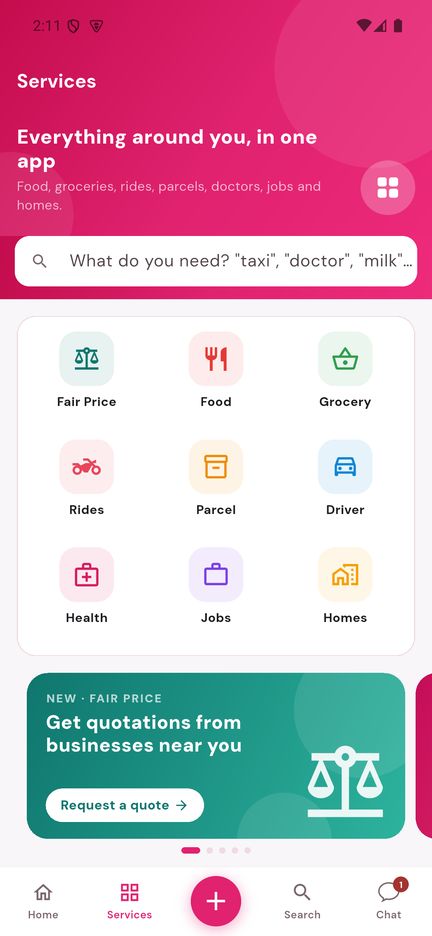
NowAt — Services hub screen

Services hub

Every NowAt service in one grid.

  1. Tap the Services tab. Type what you need ("taxi", "doctor", "milk") or tap a tile.
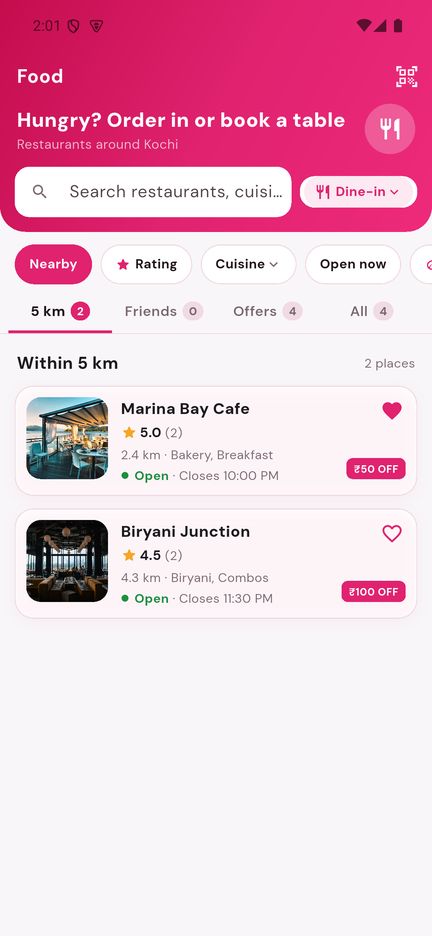
NowAt — Restaurants screen

Restaurants

Order in, take away or book a table.

  1. Choose Dine-in, Delivery or Takeaway first.
  2. Filter by nearby, rating, cuisine, open now or pure veg. See friends' favourites and offers.
NowAt — A restaurant screen

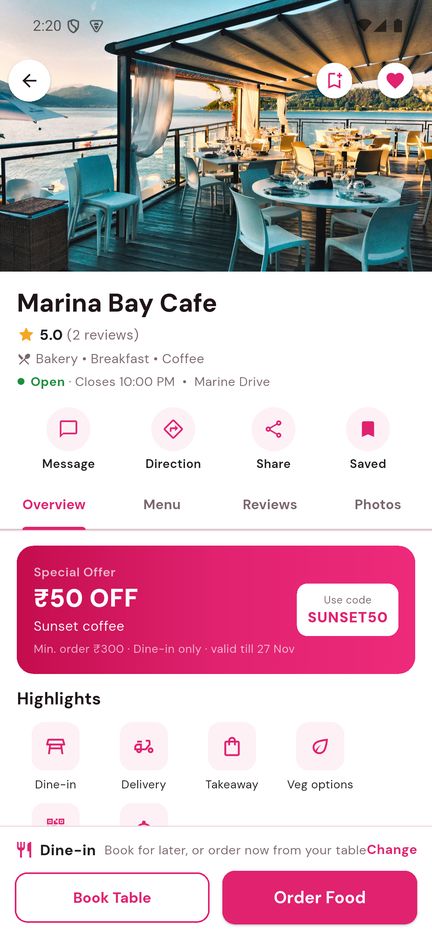
A restaurant

Menu, reviews, photos and offers.

  1. Dine-in: tap Book Table to reserve, or Order Food and scan the table QR when you are there.
  2. Delivery / Takeaway: add dishes (with add-ons) to the cart and pay by UPI.
  3. Some restaurants deliver with their own staff — your order then shows Delivered by the restaurant.
lightbulbTable bookings are free. When you dine in, you pay after eating.
NowAt — Book a table screen

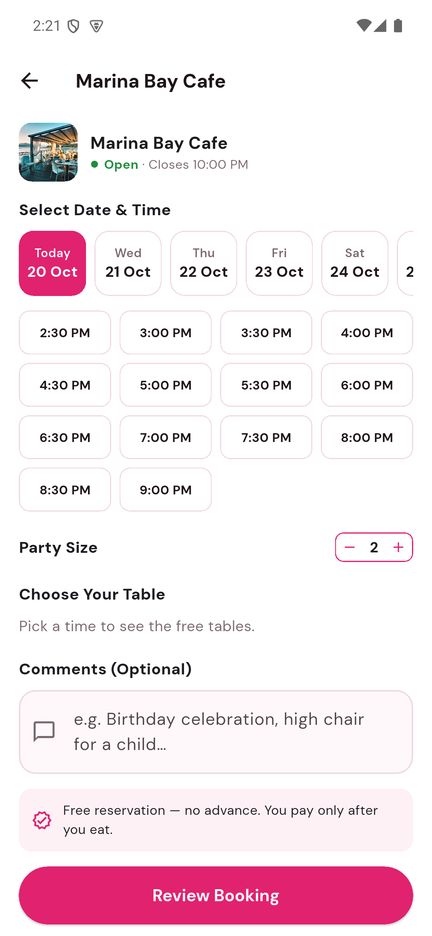
Book a table

Reserve a table in a few taps.

  1. Pick the day and time, number of guests and (optionally) the table.
  2. Add a comment (birthday, high chair …) and tap Review Booking.
  3. On the day tap I've arrived in your bookings to see the menu and order.
NowAt — Grocery screen

Grocery

Order from local shops.

  1. Browse categories or shops, tap ADD and check out with your address.
  2. Track your order in My orders.
NowAt — Rides, parcels and drivers screen

Rides, parcels and drivers

Book a car, auto or bike; send a parcel; or hire a driver for your car.

  1. Set pickup and drop on the map (or pick a saved address).
  2. Choose the vehicle and see the fare before you book.
  3. Follow your driver live on the map and message them.
NowAt — Health — doctors and OP booking screen

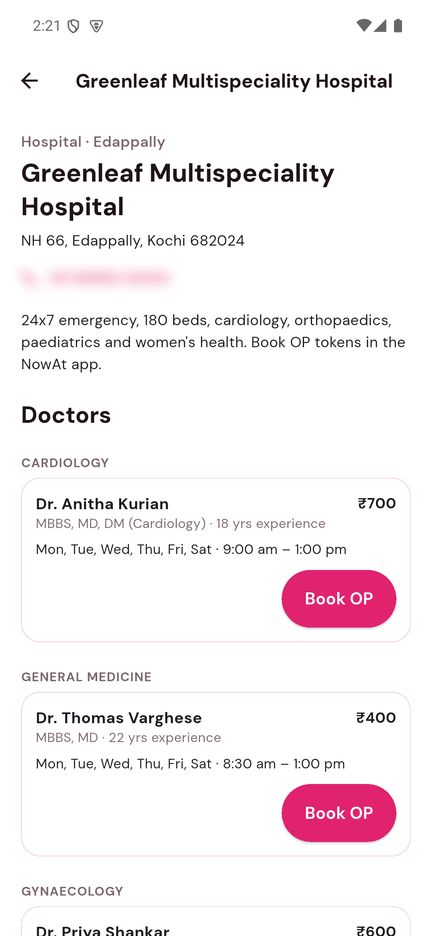
Health — doctors and OP booking

Skip the hospital queue.

  1. Search a hospital, doctor or speciality. Emergency? Tap Call 108.
  2. Open a hospital to see its doctors and timings.
NowAt — Book an OP token screen

Book an OP token

Pick a doctor and tap Book OP.

  1. Choose the day and slot. Your token number is shown in OP bookings.
NowAt — Fair Price — home services screen

Fair Price — home services

Get quotations from businesses near you, compare and book.

  1. Pick a service: AC repair, electrical, plumbing, cleaning, painting …
  2. Describe the job, add photos and choose when you need it.
NowAt — Request quotations screen

Request quotations

Businesses see your area and the job — never your phone number.

  1. Send the request, wait for quotes, compare prices and ratings, then book the one you like.
  2. After the work, leave a review.
NowAt — Jobs screen

Jobs

Find a job in Kochi.

  1. Search by title or skill, filter full-time, part-time or internship.
  2. Open a job and tap View & apply. Track it in My applications.
NowAt — Apply for a job screen

Apply for a job

Read the role and apply with your profile and resume.

  1. Tap Apply now.
NowAt — Properties screen

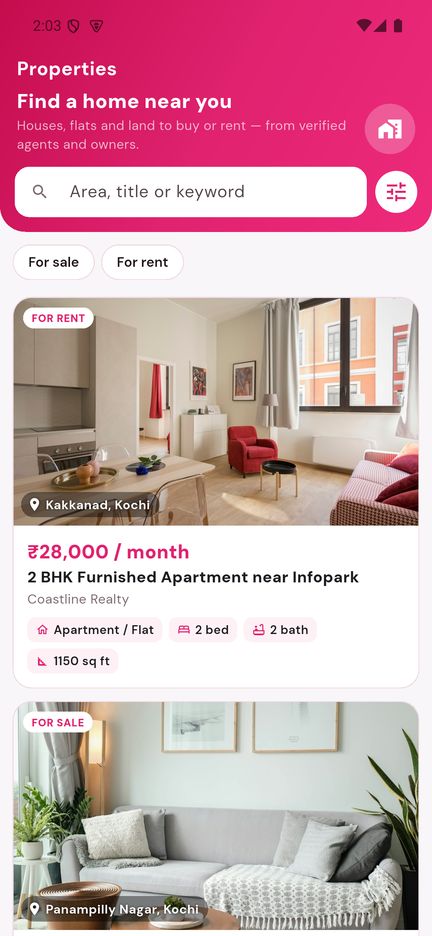
Properties

Rent or buy a home.

  1. Switch between For rent and For sale, open a listing and message the owner or agent.

Orders and bookings

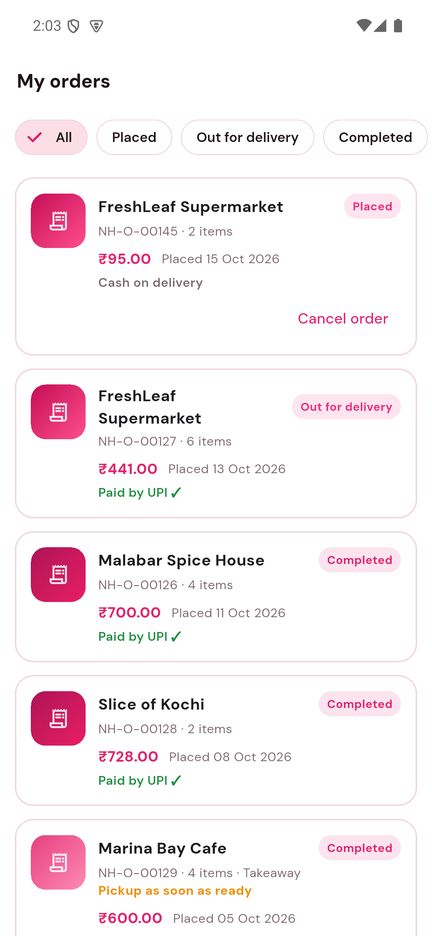
NowAt — My orders screen

My orders

Food and grocery orders.

  1. See each order's status: Placed → Confirmed → Out for delivery → Delivered.
  2. Cancel while it is still Placed. Rate it once it is delivered.
lightbulbA paid restaurant order cancelled after placing keeps a 50% cancellation fee.
NowAt — Table bookings screen

Table bookings

Your restaurant reservations.

  1. Cancel a booking, or tap I've arrived on the day.
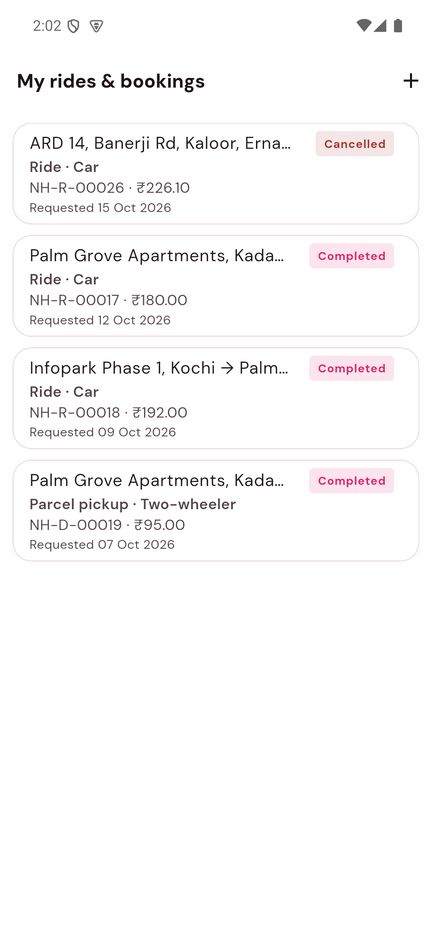
NowAt — Rides screen

Rides

Your rides, parcels and hired drivers.

  1. Open one to track it or message the driver.
NowAt — OP bookings screen

OP bookings

Your doctor appointments and token numbers.

NowAt — Fair Price bookings screen

Fair Price bookings

Your service requests, quotes and bookings.

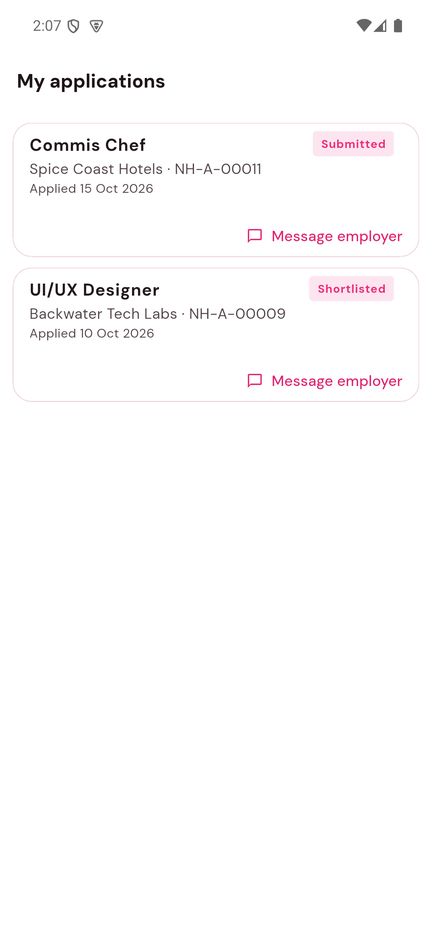
NowAt — My applications screen

My applications

Jobs you applied for and their status.

  1. Tap Message employer to ask about it.
storefront
For businesses

NowAt Business

Restaurants, shops, home-service businesses, hospitals, employers and property agents manage everything here.

Getting started

NowAt — Sign in screen

Sign in

Download NowAt Business and sign in with your mobile number.

  1. Enter your number, tap Send code and type the SMS code.
  2. Choose your business type: restaurant or shop, hospital, employer, property, or home services (Fair Price).
  3. Fill in your business details. Our team approves new businesses before they go live.

Restaurants and shops

NowAt — Your dashboard screen

Your dashboard

Everything about your restaurant on one screen.

  1. Tiles: Kitchen, Bills, Bookings, Orders, Tables & QR, Reviews, Offers, Restaurant settings.
  2. Badges show what needs you now. Your menu is listed below; tap an item to edit it.
  3. Top bar: Orders, Chat, Notifications, Account settings, Log out.
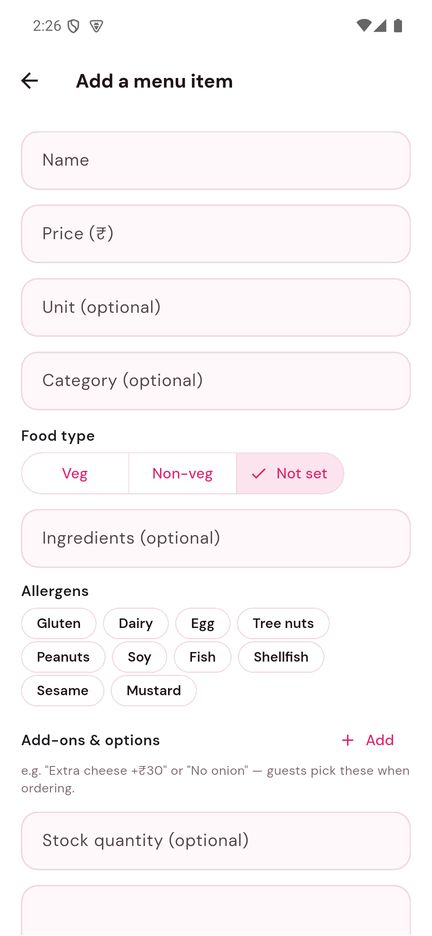
NowAt — Add a menu item screen

Add a menu item

Tap Add a menu item.

  1. Name, price, unit and category; mark it veg or non-veg.
  2. Add ingredients, allergens and add-ons (e.g. "Extra cheese +₹30").
  3. Add a photo and save. Switch items on or off when they run out.
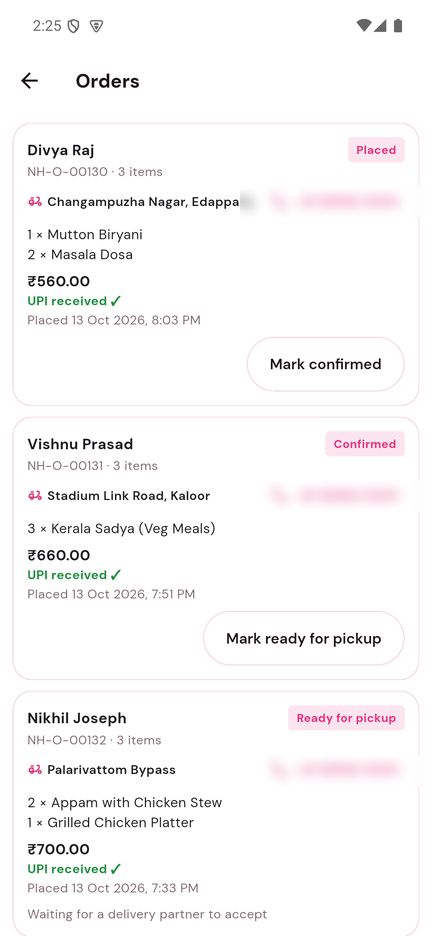
NowAt — Orders — delivery and takeaway screen

Orders — delivery and takeaway

New orders arrive here with a notification.

  1. Check the items and that the UPI payment was received, then tap Mark confirmed.
  2. When it is packed tap Mark ready for pickup — a NowAt delivery partner collects it.
  3. Takeaway: tap Handed over to customer when they collect it.
  4. Delivering yourself? Tap Sent out with our rider, then Mark delivered.
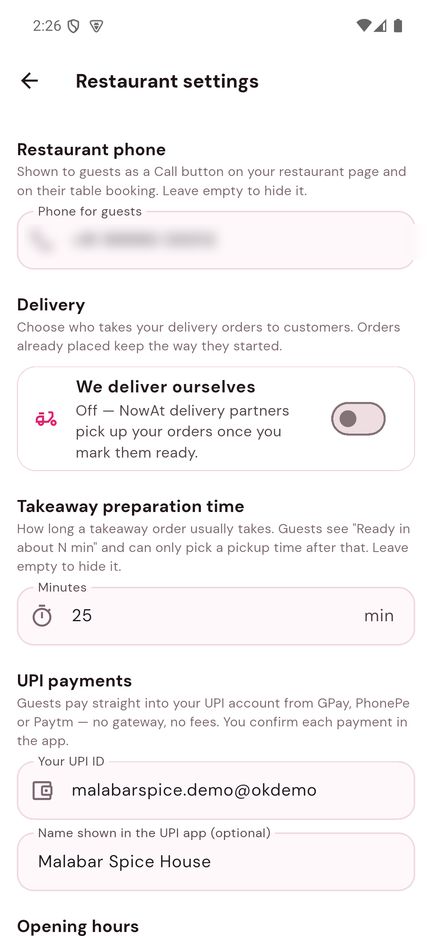
NowAt — Restaurant settings screen

Restaurant settings

Phone, delivery, takeaway time, UPI and opening hours.

  1. We deliver ourselves: switch on to deliver with your own staff. New orders then skip NowAt delivery partners. Switch off any time.
  2. Takeaway preparation time: customers can only pick a pickup time after it.
  3. UPI ID: customers pay straight into your account — no fees. Without a UPI ID you can't take online orders.
  4. Set opening hours, service charge and GST for dine-in bills, then tap Save.
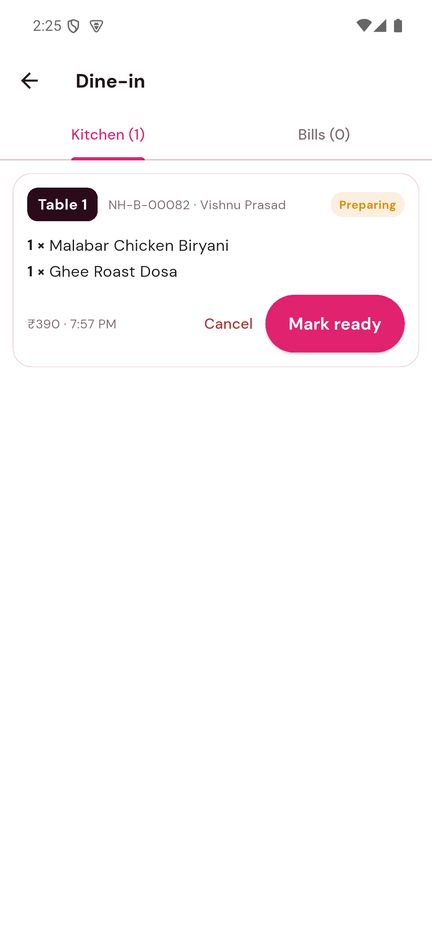
NowAt — Kitchen screen

Kitchen

Dine-in orders from tables, live.

  1. Tap Mark ready when a dish is ready, then serve it.
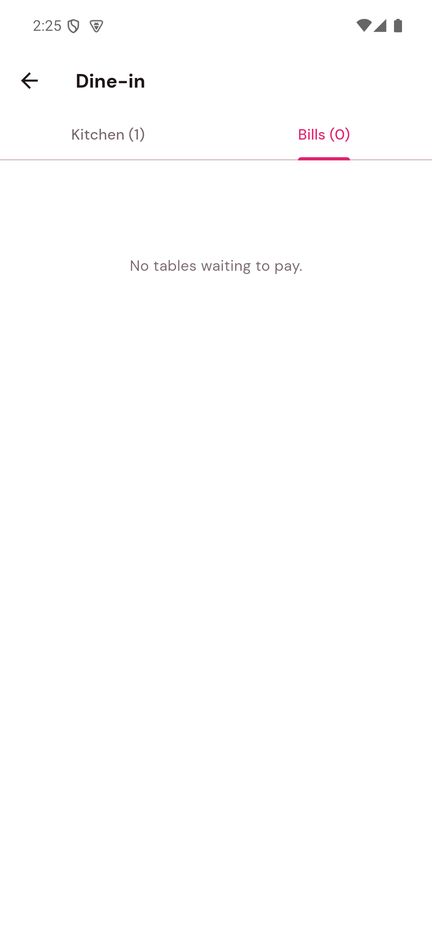
NowAt — Bills screen

Bills

Tables waiting to pay.

  1. Confirm the payment and close the table.
NowAt — Table bookings screen

Table bookings

Upcoming reservations.

  1. Seat guests when they arrive, or mark No-show after the time has passed.
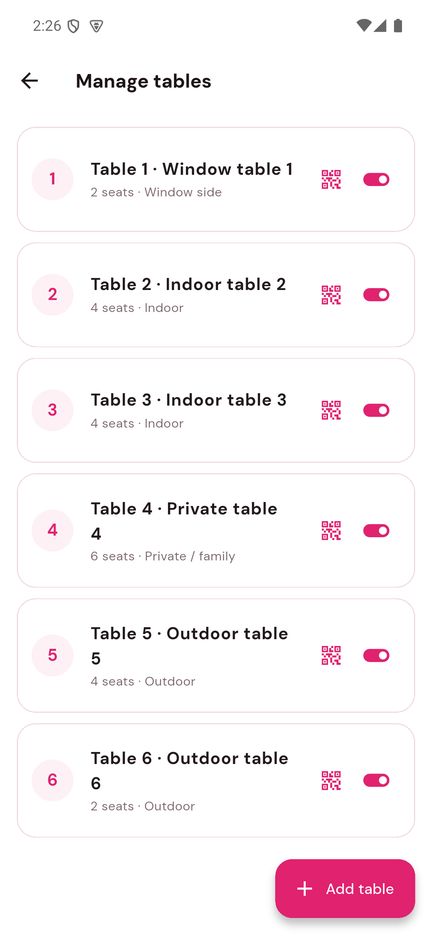
NowAt — Tables & QR screen

Tables & QR

Your tables and their QR codes.

  1. Add tables with seats and area (window, outdoor …). Print each table's QR so guests can order from their table.
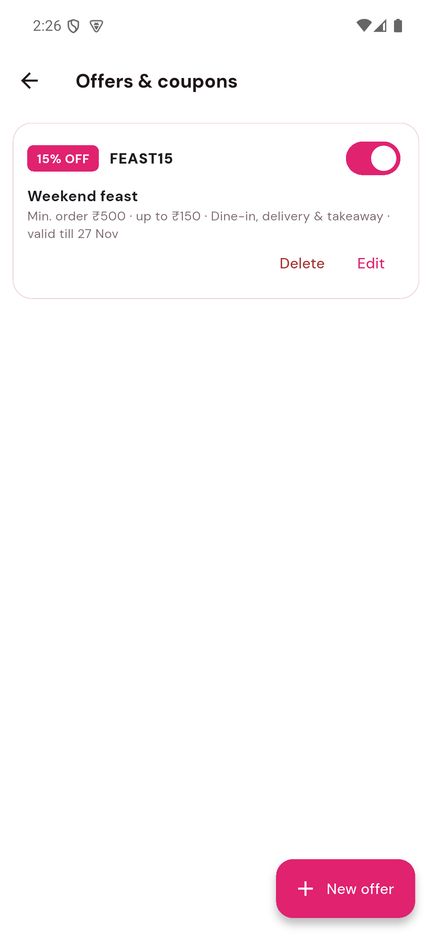
NowAt — Offers & coupons screen

Offers & coupons

Discounts for delivery, takeaway or dine-in.

  1. Tap New offer: percentage or amount, minimum order, where it applies and until when.
NowAt — Reviews screen

Reviews

What guests say about food, service and value.

Other businesses

NowAt — Fair Price for home-service businesses screen

Fair Price for home-service businesses

Get customers near you who need AC service, plumbing, cleaning, repairs and more.

  1. Tap Join Fair Price, choose your services and area.
  2. Send quotations to requests. When a customer books you, chat and do the job. Free to join.
apartment

Hospitals, employers and property

The same app runs other kinds of business.

  1. Hospitals: add doctors with fees and timings; confirm and manage OP bookings.
  2. Employers: post jobs, read applications, download resumes and message candidates.
  3. Agents & owners: list properties for rent or sale with photos and answer enquiries.
local_taxi
For drivers & delivery partners

NowAt Driver

Take rides, parcels, hire-a-driver jobs and food or grocery deliveries.

Getting started

NowAt — Sign in and register screen

Sign in and register

Download NowAt Driver and sign in with your mobile number.

  1. Enter your number and the SMS code.
  2. Register: choose your vehicle (car, two-wheeler or auto), enter the vehicle number and upload an ID proof.
  3. Our team checks your details and approves you — then jobs appear.

Taking jobs

NowAt — Your dashboard screen

Your dashboard

Your vehicle, live location and active jobs.

  1. Tap Turn on under Share your live location so customers on your job can see where you are.
  2. My active jobs lists the jobs you accepted with pickup, drop-off and payment.
  3. Tap Message customer to chat; tap Mark completed when done.
lightbulb"Paid by UPI — collect nothing" means the customer already paid. Otherwise the card shows the cash to collect.
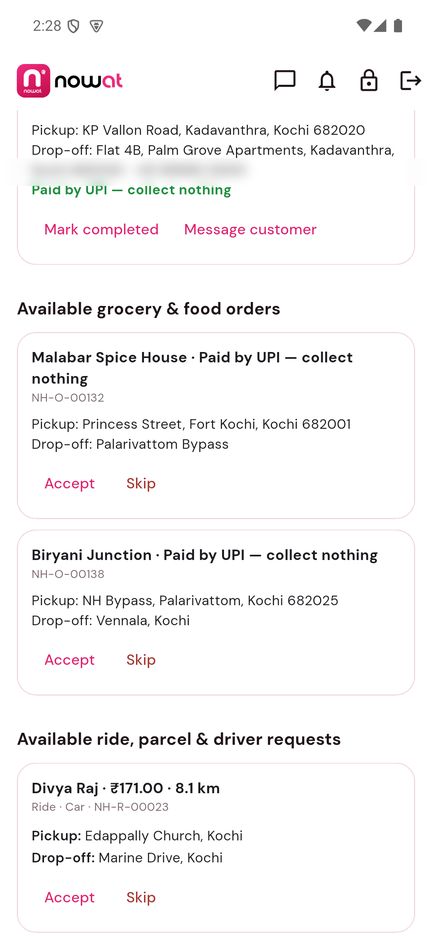
NowAt — Available jobs screen

Available jobs

New grocery & food orders and ride, parcel & driver requests near you.

  1. Tap Accept to take a job, or Skip to hide it from your list.
  2. Food orders show the restaurant, pickup and drop-off. Rides show the fare and distance.
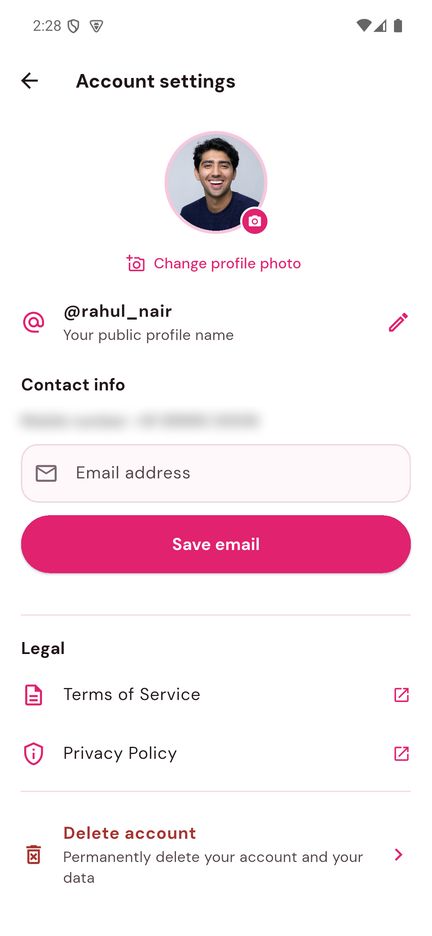
NowAt — Account settings screen

Account settings

Your photo, contact details and account.

  1. Add an email to recover your account. Use Chat and Notifications from the top bar.
Questions

Frequently asked

Is NowAt free?

Yes. The app is free. You pay only for what you order or book — straight to the restaurant, shop or driver.

How do I pay?

Restaurant delivery and takeaway are paid by UPI (GPay, PhonePe, Paytm) straight to the restaurant. Dine-in is paid after you eat. Rides and some shops take cash.

I didn't get the SMS code.

Check the number, wait 30 seconds and tap Resend code. Still nothing? WhatsApp us.

What is a circle?

A group chat around a post that anyone can join. It stays open while people use it and expires after 14 days without a message.

Who can see my check-ins?

You choose in Menu → Location & privacy, or per check-in with Special friends.

How do I delete my account?

Menu → Account settings → Delete account. You can restore it within 90 days by signing in again.

Still need help?

Message our team on WhatsApp — we reply quickly. Or download the apps to get started.